

Digital transformation is no longer limited to large enterprises. Businesses of different sizes are adopting software to automate routine work, connect departments, and improve access to operational information.
However, adding more software does not always solve the problem. When every department uses a different application, employees may still spend significant time moving data between systems, checking spreadsheets, and manually coordinating processes.
This is where an integrated ERP platform such as Odoo can be useful.
What Is Odoo ERP?
Odoo is a modular business management platform that brings multiple business functions into one connected system.
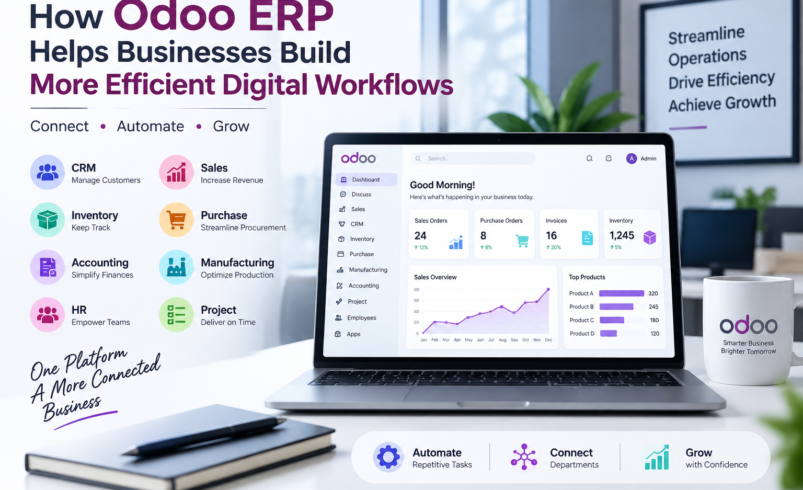
Depending on their requirements, businesses can use Odoo applications for CRM, sales, purchasing, inventory, accounting, manufacturing, projects, human resources, eCommerce, and other operational activities.
The main advantage is not simply the number of applications available. It is the ability to connect business processes and information within a common platform.
The Problem With Disconnected Business Software
Imagine a business where the sales team manages customer information in a CRM, the warehouse maintains inventory in spreadsheets, the purchasing team uses email for supplier orders, and accounting works with separate financial software.
Each individual tool may work perfectly well. The problem appears when these systems need to communicate.
Employees may have to:
- Enter the same information multiple times
- Reconcile data between systems
- Send manual updates between departments
- Prepare reports from multiple sources
- Search through emails and spreadsheets for information
- Correct errors caused by duplicate data entry
As transaction volumes increase, these small inefficiencies can become significant operational problems.
How Odoo Creates Connected Workflows
An ERP system can connect different stages of a business process.
For example, a typical sales workflow might involve a customer inquiry, quotation, sales order, inventory availability, delivery, and invoicing.
When these activities are managed through connected applications, information can move between relevant processes without requiring employees to repeatedly recreate the same data.
This creates a more structured workflow and can improve visibility across departments.
Key Ways Odoo Can Improve Business Efficiency
1. Automating Repetitive Tasks
Automation is one of the most practical benefits of ERP software.
Businesses can automate selected activities such as notifications, approval workflows, invoice generation, inventory updates, and routine follow-ups.
The goal is not to automate every task. Human judgment remains important. Instead, automation should focus on repetitive activities where manual effort adds little value.
2. Creating a Centralized Data Environment
When information is scattered across spreadsheets and applications, maintaining consistency becomes difficult.
Odoo allows businesses to maintain connected records for customers, products, suppliers, sales, purchases, inventory, and other business activities.
This can make information easier to access and reduce unnecessary duplication.
3. Improving Inventory Visibility
Inventory management is particularly dependent on accurate information.
Businesses need to know what products are available, what has been ordered, what has been delivered, and when replenishment may be required.
Odoo’s inventory functionality can help businesses manage stock movements, warehouses, replenishment, and related processes through a centralized system.
4. Connecting Sales and Finance
Sales and accounting are closely connected, yet many businesses manage them through separate workflows.
An integrated ERP can connect sales transactions with invoicing and related financial processes.
This can reduce manual data entry and help finance teams work with information generated by operational activities.
5. Supporting Better Business Decisions
Business decisions are only as good as the information behind them.
When operational data is centralized, businesses can create reports and dashboards covering areas such as sales performance, inventory, purchasing, customer activity, and financial operations.
This can give management better visibility without requiring employees to manually combine information from several systems every time a report is needed.
Why Odoo Implementation Is Important
Choosing Odoo is only the first step.
The system still needs to be configured around the organization’s processes. Poor configuration can create unnecessary complexity even when the software itself is capable of solving the underlying problem.
A proper implementation typically involves:
- Understanding business requirements
- Mapping existing workflows
- Selecting suitable Odoo applications
- Configuring the system
- Preparing and migrating data
- Integrating third-party applications
- Customizing specific functionality when necessary
- Testing workflows
- Training employees
- Providing post-launch support
Businesses evaluating Odoo implementation services should therefore look at the entire implementation process rather than focusing only on software installation.
Customization: How Much Is Too Much?
One of the biggest decisions during implementation is determining whether standard Odoo functionality is sufficient.
Customization can be useful when a business has a genuine requirement that cannot be handled effectively through standard functionality.
But customization should not automatically be the first solution.
If every existing process is reproduced exactly as it was before, the business may miss opportunities to simplify inefficient workflows. Excessive customization can also increase maintenance costs and make future upgrades more complicated.
A better approach is to first evaluate whether the existing process can be improved using standard functionality.
Preparing Employees for the Change
Technology alone cannot transform a business.
Employees need to understand how the new system changes their daily workflows. Sales representatives, accountants, warehouse employees, managers, and administrators may all interact with Odoo differently.
Role-specific training and practical testing can help employees understand the system before the business goes live.
This is particularly important because resistance to new software often comes from unclear processes rather than the technology itself.
Common ERP Implementation Mistakes
Businesses should watch for several common problems during implementation.
Implementing Without Clear Objectives
If a business cannot explain what problems the ERP is supposed to solve, it becomes difficult to measure whether the implementation was successful.
Poor Data Preparation
Moving inaccurate or duplicate data into a new system can create problems throughout the organization.
Excessive Customization
Custom development should address genuine requirements rather than compensate for poor process planning.
Inadequate Testing
Testing should cover complete business workflows, not just individual features.
Insufficient Training
Employees need enough practical training to confidently perform their responsibilities within the new system.
A Practical Approach to Odoo Adoption
A sensible Odoo implementation starts with business requirements rather than a list of software features.
First, identify the processes that create the most manual work or operational problems. Then determine which Odoo applications can address those requirements.
From there, businesses can configure the system, prepare their data, establish integrations, test real workflows, and train users.
For larger organizations, implementing the system in phases can also make the transition easier to manage.
Final Thoughts
An ERP system should make business operations more connected and manageable, not simply add another layer of technology.
Odoo can help businesses bring sales, customer management, purchasing, inventory, accounting, manufacturing, projects, and other functions into a connected environment.
But successful results depend on how the system is implemented.
Businesses that approach Odoo as a process improvement project, rather than simply a software installation, are more likely to achieve meaningful improvements in efficiency, visibility, automation, and long-term scalability.